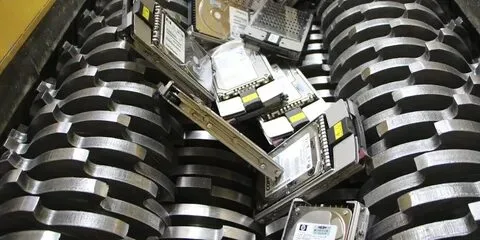
Old hard drives shredding can contain much more than outdated files. They may store personal information, business records, customer data, financial documents, passwords, and other sensitive information. Simply deleting files or throwing an old drive into the trash does not necessarily make that information unrecoverable.
For residents and businesses in Scranton, PA, safe hard drive disposal should combine data security, responsible electronics recycling, and proper handling of electronic waste.
Electro Cycle provides electronics recycling and IT asset disposition services in Scranton, including free hard drive shredding, data destruction, equipment pickup, and responsible electronics recycling.
What Is the Safest Way to Dispose of an Old Hard Drive?
The safest approach is to make the data inaccessible before the hard drive enters the recycling or disposal process. Depending on the drive and situation, this can involve secure data wiping or physical destruction such as hard drive shredding.
For drives containing sensitive information, physical destruction provides a straightforward way to prevent the drive itself from being reused or accessed.
The disposal process generally involves:
- Identify the hard drive and the information it contains.
- Determine whether the data needs to be preserved or destroyed.
- Use secure data wiping or physical destruction.
- Send the remaining electronic components through an appropriate recycling process.
- Maintain documentation when required for business or compliance purposes.
Why You Shouldn’t Throw Old Hard Drives in the Trash
Hard drives are electronic devices and should not automatically be treated like ordinary household garbage.
Pennsylvania has specific requirements surrounding covered electronic devices. The Pennsylvania Department of Environmental Protection explains that the state’s Covered Device Recycling Act establishes recycling requirements for certain electronics and provides collection programs intended to keep electronic waste out of inappropriate disposal channels.
There is also a data-security issue.
A discarded hard drive could potentially remain readable if its information has not been securely erased or physically destroyed. That makes improper disposal a potential privacy concern for individuals and a data-security concern for organizations.
Is Deleting Files Enough?
No. Simply deleting files is not the same as securely destroying the data.
When you delete a file from a traditional hard drive, the operating system may remove the reference to the file while portions of the underlying information remain on the storage device until overwritten.
Formatting a drive isn’t necessarily equivalent to physical destruction either.
That’s why organizations handling confidential information often use dedicated data destruction, secure wiping, or physical hard drive shredding processes.
The appropriate method depends on the type of drive, the sensitivity of the information, and whether the device will be reused or permanently retired.

Hard Drive Shredding vs. Data Wiping
Both methods can be used for secure data disposal, but they serve different purposes.
Data wiping uses specialized processes to remove information from a storage device while potentially leaving the hardware usable.
Hard drive shredding physically destroys the storage device, making the original drive unusable.
If a hard drive is being permanently retired and contains sensitive information, physical destruction can provide an additional layer of assurance because the physical storage media is destroyed rather than simply being prepared for reuse.
Electro Cycle states that it checks devices before recycling to ensure information is removed through wiping or physical destruction.
How to Safely Dispose of Old Hard Drives in Scranton
If you have old desktop computers, laptops, servers, external hard drives, or other IT equipment, start by determining what information is stored on the devices.
Step 1: Identify Sensitive Data
Consider whether the drive contains:
- Personal identification information
- Tax documents
- Banking information
- Customer records
- Employee information
- Business documents
- Passwords
- Medical or financial records
- Proprietary company information
Businesses should be particularly careful with retired equipment because an old drive can contain years of accumulated information.
Step 2: Decide Whether the Drive Will Be Reused
If the hard drive is still intended for reuse, secure data wiping may be appropriate.
If the device is being permanently retired and the information must not be recoverable, physical destruction may be the preferred approach.
Don’t make this decision based solely on whether the computer turns on. A nonfunctional computer can still contain readable data.
Step 3: Choose a Secure Disposal Provider
Look for an electronics recycling or IT asset disposition provider that handles data destruction and electronics recycling rather than simply accepting old equipment as scrap.
For Scranton businesses, an ITAD provider can help coordinate equipment retirement, data destruction, recycling, and equipment pickup.
Electro Cycle offers IT asset disposition services in Scranton and works with businesses on electronics recycling, data destruction, and IT equipment cleanup.
Step 4: Ask How the Data Is Handled
Before handing over equipment, ask important questions:
- Is the data wiped or physically destroyed?
- Are hard drives shredded?
- How are devices handled before destruction?
- Is documentation available?
- Can equipment be picked up?
- How are remaining electronic components recycled?
Knowing the process helps you select a disposal solution appropriate for the sensitivity of your information.
Step 5: Recycle the Remaining Electronics Responsibly
Secure data destruction is only one part of responsible IT equipment disposal.
After sensitive information is removed or the storage device is destroyed, electronic components should be directed toward appropriate recycling or reuse channels.
The Pennsylvania DEP maintains information about electronics recycling collection programs and advises consumers to contact the relevant program before visiting because accepted materials, schedules, residency requirements, and fees can vary.
The City of Scranton also maintains information about hard-to-recycle items, including computer and electronic materials.
What About Businesses in Scranton?
Businesses often have more complicated disposal needs than individual households.
An office technology upgrade can generate dozens or even hundreds of retired devices. Those computers and servers may contain customer information, employee records, financial data, proprietary documents, and credentials.
That’s where IT Asset Disposition (ITAD) becomes useful.
ITAD involves managing retired technology from collection and transportation through data destruction, reuse, recycling, and final disposition.
Electro Cycle offers ITAD services in the Scranton area and states that its services include securely handling old IT equipment, wiping data, and properly managing retired equipment.
For organizations, having a structured disposal process can also make equipment retirement easier to track and manage.
Does Scranton Offer Electronics Recycling?
Yes. The City of Scranton maintains recycling resources for hard-to-recycle materials, including computer and electronic materials, and Pennsylvania maintains statewide electronics recycling information.
However, electronics recycling and secure hard drive destruction are not necessarily the same service.
A recycling location may accept computers or electronics without providing the specific physical destruction process your sensitive data requires. Always confirm how storage devices are handled before handing over equipment containing confidential information.
Why Choose Electro Cycle for Hard Drive Disposal?
Electro Cycle is a locally operated electronics recycling and ITAD provider serving Scranton, PA.
The company offers:
- Free hard drive shredding
- Data destruction
- Electronics recycling
- IT asset disposition
- Electronics pickup
- Lease return services
- Responsible reuse and recycling
Electro Cycle states that it serves both individuals and businesses and focuses on secure, eco-friendly electronics recycling.
For businesses that have accumulated computers, servers, copiers, hard drives, and other technology, pickup and IT equipment cleanup can also simplify the disposal process.
Final Thoughts
Safely disposing of an old hard drive involves more than getting rid of unwanted electronics. You need to consider data security, physical destruction, electronics recycling, and responsible final disposition.
Whether you’re clearing out a home office or retiring an entire company’s IT infrastructure, don’t assume that deleting files makes sensitive information disappear.
For free hard drive shredding and electronics recycling in Scranton, PA, Electro Cycle provides data destruction, IT asset disposition, equipment pickup, and responsible electronics recycling services for residents and businesses.
When sensitive data is involved, secure destruction should be part of your disposal plan, not an afterthought.
Frequently Asked Questions
Can I throw an old hard drive in the trash?
It is better to use an appropriate electronics recycling and data destruction solution rather than treating a storage device like ordinary household garbage. Pennsylvania has specific electronics recycling requirements and collection programs.
Is formatting a hard drive enough before recycling it?
Formatting should not automatically be treated as equivalent to secure data destruction. Depending on the circumstances, secure wiping or physical destruction may be more appropriate.
What is hard drive shredding?
Hard drive shredding is a physical data destruction method that breaks down the storage device so the original drive cannot simply be reused.
Does Electro Cycle offer free hard drive shredding in Scranton?
Yes. Electro Cycle advertises free hard drive shredding as one of its services in Scranton, PA.
Can businesses schedule electronics pickup?
Yes. Electro Cycle states that it provides pickup services for businesses with old computers, copiers, and other equipment.
