When computers, servers, hard drives, and other technology reach the end of their useful life, businesses cannot simply throw them away. Old IT equipment may contain sensitive company information, customer records, passwords, financial data, and other confidential files.
A structured IT asset disposition checklist helps organizations securely retire outdated equipment while reducing data-security risks, recovering potential asset value, and ensuring electronics are handled responsibly.
Whether your company is replacing a few computers or decommissioning an entire office, these 10 steps can help you build a safer IT asset disposition process.
By following this IT asset disposition checklist, businesses can learn how to manage old IT equipment securely, choose appropriate data destruction methods, recover value from reusable assets, maintain chain of custody, and ensure responsible electronics recycling.
What Is an IT Asset Disposition Checklist?
An IT asset disposition checklist is a step-by-step process businesses use when retiring unwanted technology. It covers everything from inventory and data sanitization to reuse, resale, recycling, and documentation.
IT asset disposition, commonly called ITAD, may include laptops, desktops, servers, storage devices, networking equipment, monitors, printers, and other electronic assets.
A strong ITAD process should address three main priorities:
- Protect sensitive data.
- Recover value from reusable equipment.
- Responsibly recycle devices that have reached the end of life.
1. Create an Inventory of IT Assets
Start your IT asset disposition checklist by identifying every device being retired.
Record information such as:
- Asset type
- Manufacturer and model
- Serial number
- Asset tag
- Condition
- Storage-device type
- Assigned employee or department
Accurate asset inventory reduces the risk of equipment being lost during decommissioning and helps maintain accountability throughout the disposition process.
2. Determine Which Equipment Should Be Retired
Not every older device immediately needs recycling. Evaluate its age, condition, functionality, security capabilities, repair costs, and potential resale value.
Equipment may be suitable for:
Reuse: Devices that can continue operating internally.
Remarketing: Functional equipment with secondary-market value.
Recycling: Broken, obsolete, or economically unusable electronics.
This assessment helps businesses maximize IT asset recovery before recycling equipment.
3. Back Up Important Business Data
Before removing equipment from service, verify that necessary files have been transferred or backed up.
Check whether employees have stored documents locally rather than in approved cloud or network environments.
Once a device enters the ITAD process, recovering forgotten information may no longer be possible.
4. Remove Devices From Company Systems
A complete IT asset disposition checklist should include digital decommissioning.
Remove retired devices from:
- Device-management platforms
- Company accounts
- Software licenses
- VPN access
- Cloud services
- Security platforms
- Employee asset records
Also disable associated user accounts or credentials when appropriate.

5. Select the Correct Data Destruction Method
Simply deleting files or performing a basic factory reset may not provide the level of protection required for sensitive business information.
Data sanitization methods can include secure wiping, cryptographic erasure, or physical destruction depending on the storage media and risk level.
NIST defines media sanitization as making access to target data infeasible for a given level of effort and guides organizations in establishing sanitization programs.
For drives that will not be reused, physical hard drive shredding can provide a clear destruction path.
6. Maintain a Secure Chain of Custody
Your IT asset disposition checklist should document who handles equipment from collection through final processing.
A secure chain of custody helps businesses track assets while reducing the possibility of devices becoming lost, stolen, or improperly handled.
For large IT cleanouts, asset tracking and controlled transportation are especially important.
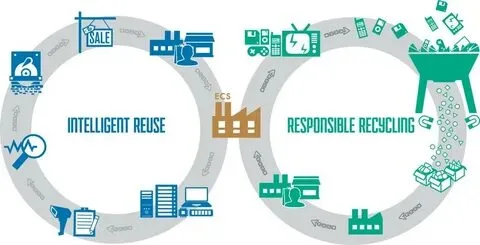
7. Separate Equipment for Reuse, Resale, and Recycling
Once data security requirements have been satisfied, sort equipment according to its remaining value.
Working devices may qualify for resale or reuse, while nonfunctional electronics can be sent for responsible recycling.
This approach supports both cost recovery and sustainable IT lifecycle management.
8. Recycle End-of-Life Electronics Responsibly
Electronics contain metals, plastics, glass, and other recoverable materials. The EPA recommends properly donating or recycling used electronics because doing so helps conserve resources and reduce the need for virgin materials.
Your IT asset disposition checklist should therefore include a clear process for equipment that cannot be reused or remarketed.
Avoid sending unwanted business electronics directly to ordinary waste streams when appropriate recycling options are available.
9. Keep Data Destruction and Disposition Records
Documentation strengthens accountability.
Depending on the services performed, businesses may maintain:
- Asset reports
- Serial-number records
- Pickup documentation
- Chain-of-custody records
- Data-destruction records
- Recycling documentation
These records can also support internal audits, security reviews, and corporate sustainability reporting.
10. Work With an Experienced ITAD Provider
Managing hundreds of devices internally can become difficult, particularly when secure data destruction, transportation, inventory tracking, resale, and electronics recycling are involved.
An experienced ITAD provider can coordinate multiple stages of the disposition process.
Electro Cycle helps businesses manage unwanted IT equipment through services including IT asset disposition, electronics recycling, hard drive shredding, electronics wholesaling, and lease return processing.
Quick IT Asset Disposition Checklist
Before your next technology refresh, confirm that you:
- Inventory all IT assets.
- Evaluate equipment condition and value.
- Back up required data.
- Remove devices from company systems.
- Sanitize or destroy stored data.
- Maintain chain of custody.
- Identify equipment suitable for resale.
- Recycle unusable electronics.
- Retain disposition documentation.
- Review the completed ITAD process.
Following an IT asset disposition checklist makes large technology refreshes easier to control and reduces avoidable security and operational risks.
Final Thoughts
A well-planned IT asset disposition checklist protects more than old hardware. It helps protect business information, maintain accountability, recover residual equipment value, and keep reusable materials in productive circulation.
By combining inventory management, secure data destruction, IT asset recovery, electronics recycling, and proper documentation, businesses can create a safer and more efficient IT disposal strategy.
Frequently Asked Questions
What does IT asset disposition mean?
IT asset disposition is the process of securely retiring, reusing, reselling, recycling, or destroying outdated business technology.
Why is an IT asset disposition checklist important?
An IT asset disposition checklist creates a repeatable process for protecting data, tracking equipment, recovering value, and managing electronics responsibly.
Should hard drives be wiped or shredded?
The appropriate method depends on the media, whether it will be reused, the sensitivity of the information, and the organization’s security requirements. NIST’s current media-sanitization guidance can help organizations establish appropriate sanitization controls.
Can old business computers still have value?
Yes. Functional computers, servers, networking equipment, and components may have resale or reuse value depending on their age, specifications, condition, and market demand.
What happens to IT equipment after it enters the ITAD process?
Once equipment enters the ITAD process, it is typically inventoried, assessed for reuse or resale, cleared of sensitive data, and then either remarketed, recycled, or physically destroyed based on its condition and security requirements.
